Sales Forecast — Data-Driven Goals, Not Guesswork
Web application for Febeca that forecasts each salesperson's sales with a trend-and-seasonality model, reconciles them with management's budget and splits them into goals by brand, item and customer.
Stack
- Next.js
- TypeScript
- Supabase
- Tailwind CSS
- Chart.js
- PostgreSQL
- Vercel
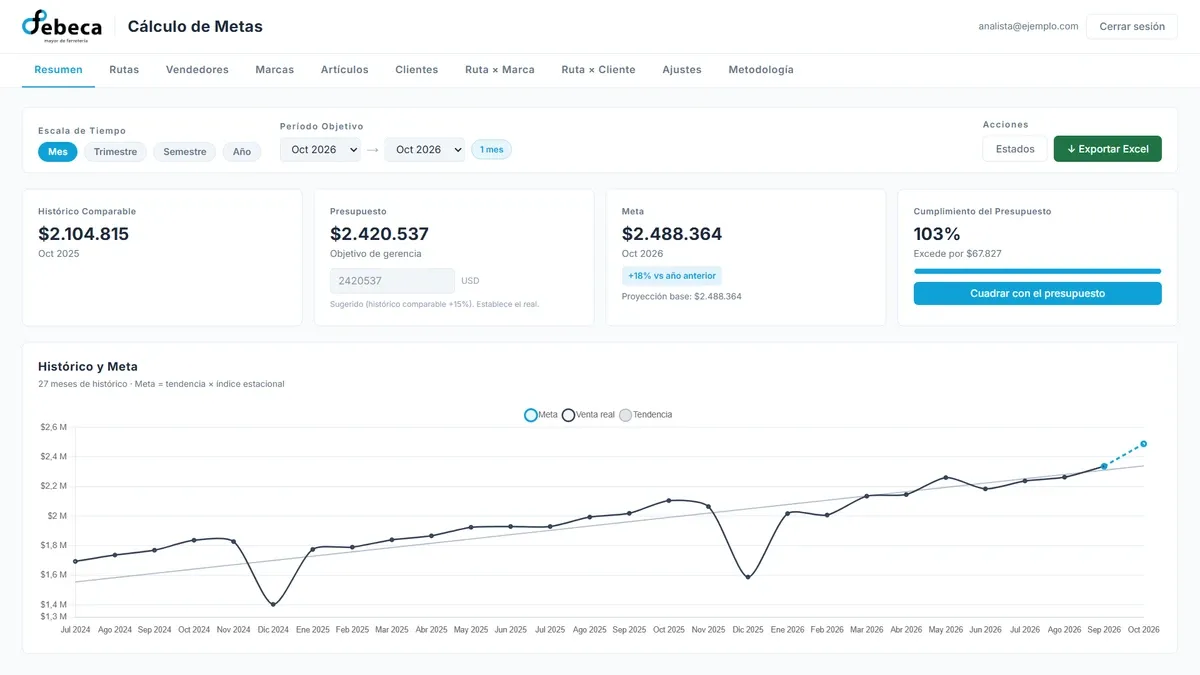
Web application at Febeca for setting the sales force’s goals. It forecasts how much each salesperson should sell from their history, reconciles that with the budget management sets, and splits it into goals by brand, item and customer, for the month, the quarter, the half-year or the year.
The problem
Goals were set in Excel. You started from last year’s sales, added a flat growth percentage and adjusted by eye. Each salesperson’s budget was entered by hand, in a rather arbitrary way, because there was no reliable way to estimate, even roughly, how much they would sell the following month. As a result, many salespeople ended up with a goal that was far too high or far too low.
That method also could not tell a salesperson’s real growth apart from a month that is always weaker or stronger than the rest, so it treated someone who had been growing the same as someone who had been falling. Breaking the goal down by brand and by customer multiplied the work, and the tables easily stopped adding up to each other. And when a salesperson’s goal was raised or lowered by hand, the reason was written down nowhere: three months later the number was still there, and nobody remembered where it had come from.
The solution
An application that separates what history says from what management decides.
- The forecast is what the model predicts from history, with nobody’s opinion in it.
- The budget is the target management sets. The application suggests one — the same period last year plus the expected growth — and management overrides it.
- The goal is what each salesperson finally gets: the forecast plus adjustments, reconciled against the budget. One button squares it with the budget.
The model separates level from shape. Each month’s forecast is a trend times that month’s index. The trend is a line fitted over each salesperson’s recent months and provides the level: where their sales are heading. The seasonal index provides the shape: it shows when a month sells noticeably more or less than an average one. It is computed on the company’s total sales and the twelve indices average one, so they only redistribute between months and never change the period’s total.
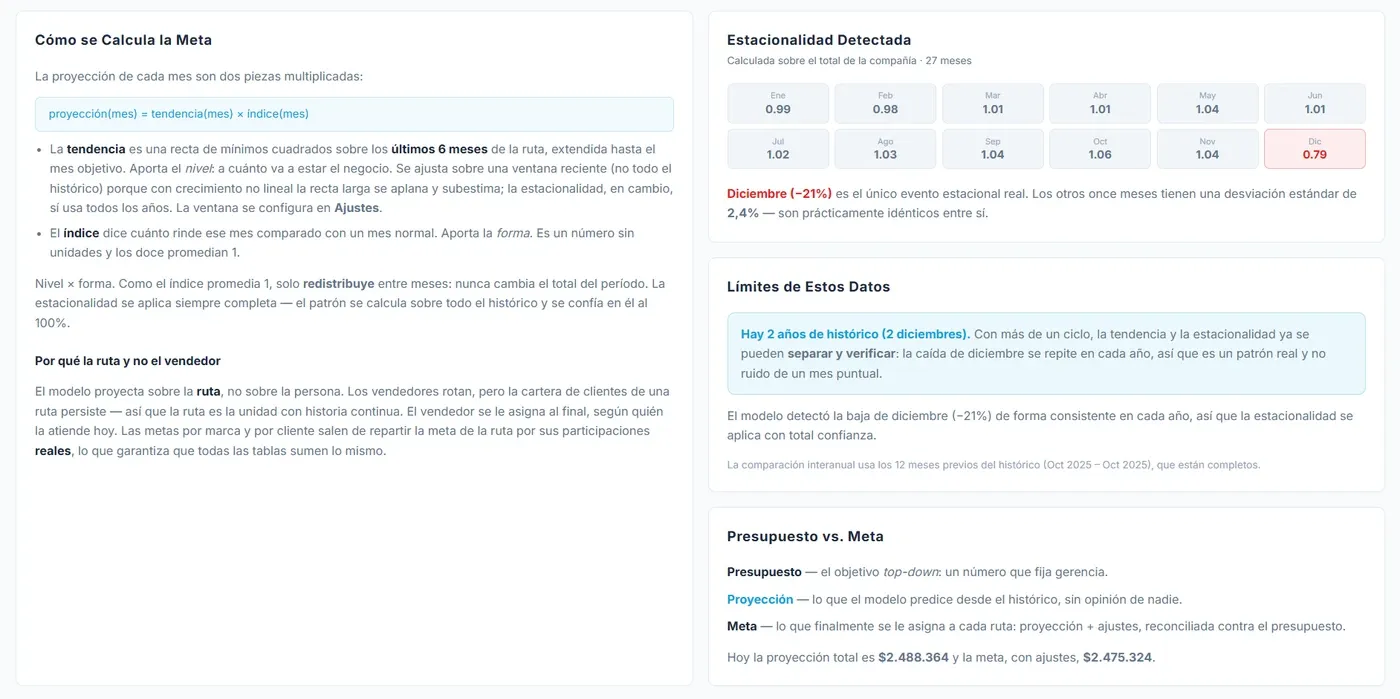
The Methodology view, with sample data. The application explains its own calculation and shows the seasonality it detected, so whoever receives a goal can see where it comes from.
The salesperson’s zone is forecast, not the person. A zone is the set of customers a salesperson covers, and most salespeople have just one, so forecasting their zone is forecasting their sales. The difference shows when someone rotates: salespeople change, but a zone’s customers stay, and with them the history. The goal is assigned at the end to whoever covers the zone today. Goals by brand, item and customer come from splitting it by each one’s real weight within it, which is why every table adds up to the same total.
Each goal is compared with previous periods. Next to each salesperson’s goal is what they sold before, so you can see at a glance how much growth is being asked of them, or how much they would fall, and colours flag the cases worth stopping at before accepting it.
Adjustments carry their reason. Any goal can be adjusted by percentage or amount — a salesperson’s, a brand’s, an item’s, a customer’s, or a brand within a salesperson’s zone — and each adjustment can carry a note: the salesperson was on leave, a large customer opened. The model ignores it, but it is the only place the reasoning is recorded.
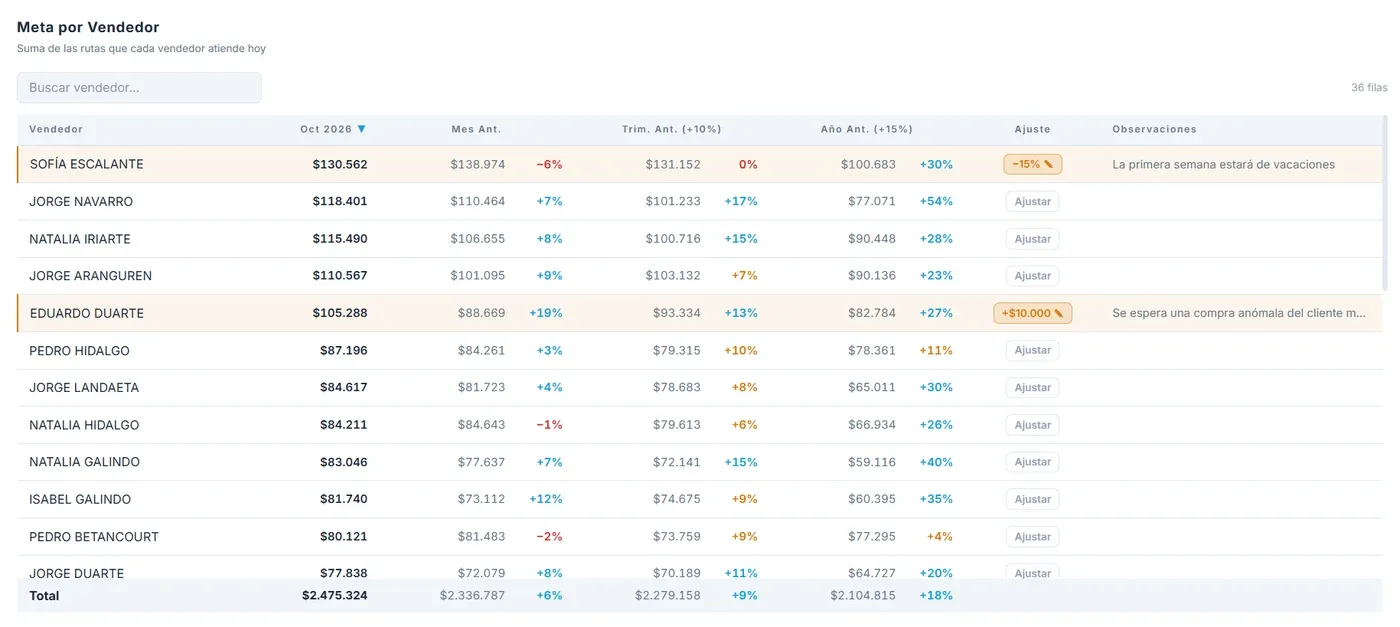
Goals by salesperson, with sample data. Each one next to past sales, and two manual adjustments with their notes: the reason sits beside the number it changed.
Work is saved and picked up again. A saved state keeps the full configuration — period, budget, model parameters and adjustments — not the results: when it is opened, the numbers are recalculated on current data. States that refer to months already closed are marked as expired and kept as a record.
The application exports every table to Excel and, separately, the goal format management asks for, at customer and brand level, calculated by the same engine shown on screen.
My role
I was the sole developer of the application: I designed the forecasting model and the interface, and handled the frontend, data processing, authentication and deployment.
- Model: least-squares linear regression for the trend, seasonal indices on the detrended series, and optional clipping of outlier months so one exceptional order does not bend a salesperson’s line. Months already closed are not forecast: actual sales are used.
- Data: the source is an Excel file of over 90 MB, at customer, item and month level. A script turns it into a compact dataset that does not repeat what can be derived, and the application indexes it with typed arrays to recalculate every table instantly across more than a million records.
- Security: the dataset is the company’s complete sales, customer by customer. It lives in private storage and is only handed to signed-in users on an allow-list, through a signed link that expires in two minutes. The session is checked on the server, before a single page is served.
- Frontend: Next.js, TypeScript, Tailwind CSS and Chart.js, with its own URL for each view and history, trend and goal in a single chart.
- Tests: 106 automated tests on the model, aggregation, periods, saved states and comparisons.
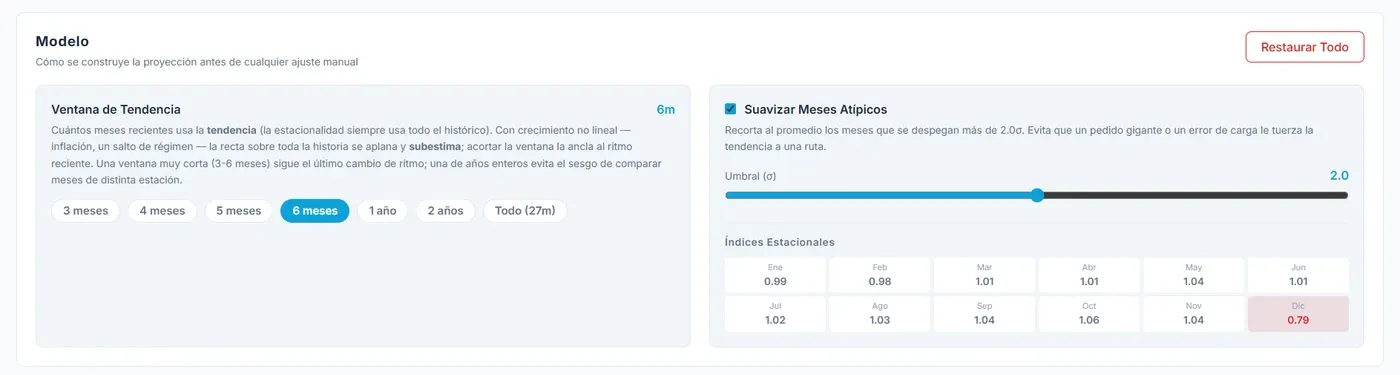
The model’s parameters: how many months the trend uses and whether outlier months are clipped. Changing them recalculates every goal instantly.
Project status
In use since July 2026, and it was a turning point: since then the company has set its sales goals with this application rather than the Excel file it used before. I used it to calculate the goals, and management used it to follow trends and forecasts.
It is an internal tool: it is deployed on the web and its code lives in a GitHub repository, but, for confidentiality reasons, this case does not link to the site or to the code. For the same reason, the screenshots use sample data.